Crash, the Stresseur test robot

Hi, I'm Crash. I crash-test every pull request, before your customers do.

AI test engineer for API teams

Real end-to-end tests,
in seconds.

API tests that keep up with your code.

Your coding agent ships code faster than your tests can check it. Stresseur records your real API flows, turns them into tests, and runs them on every pull request, flagging the step that got slower.

Real end-to-end tests at the API level, fast enough to run after every change. On one shop journey, 10 runs took 2.2 s as an API flow and 11.2 s in a browser.How we measured

Functional · Regression · E2E · Stress

Free for one repo. 14-day Team trial, no card.

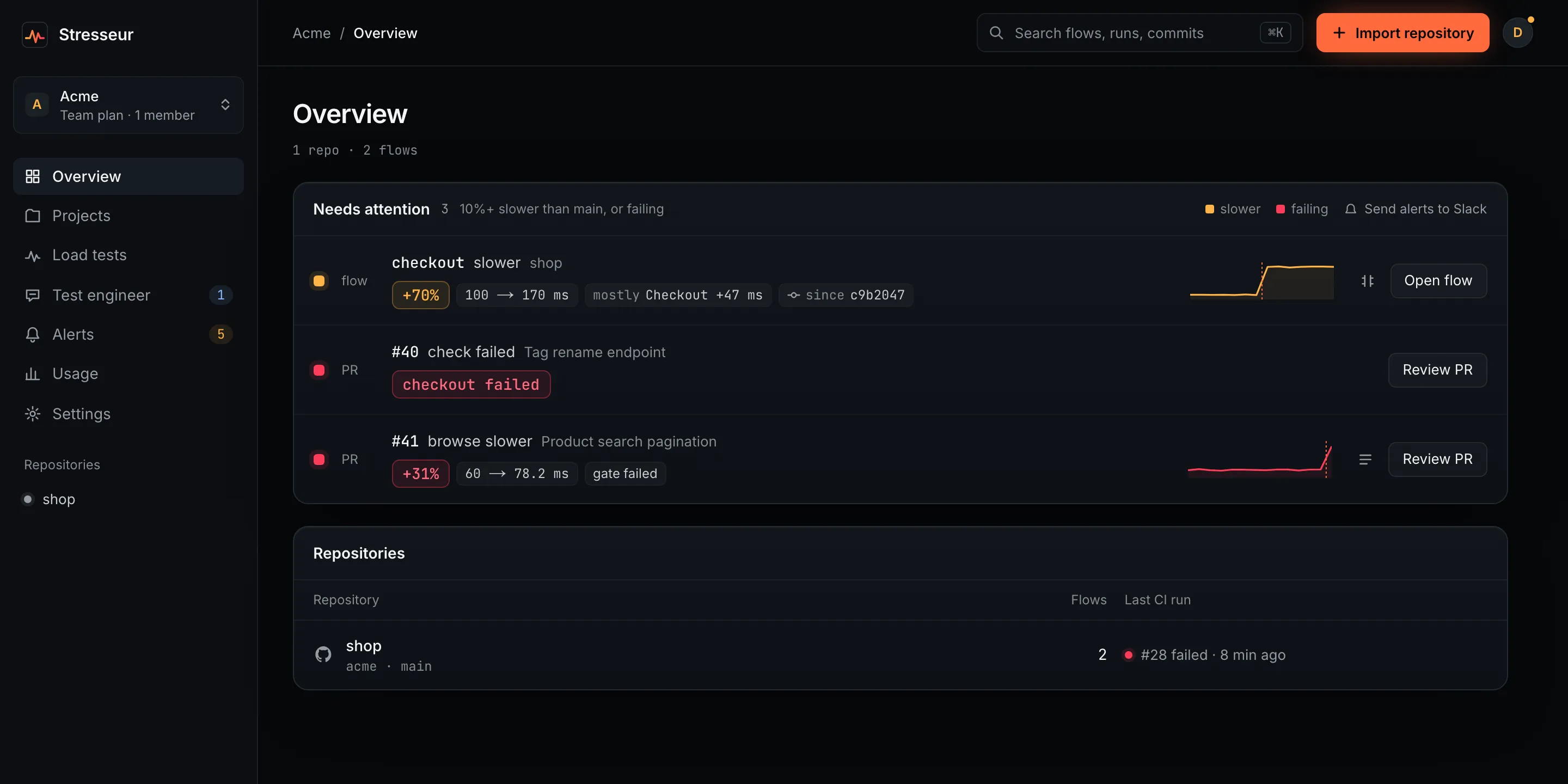
Stresseur Overview for a sample workspace. Needs attention lists three items: the checkout flow is 70% slower (100 to 170 ms), mostly in the Checkout step; PR #40 failed its check; PR #41 makes the browse flow 31% slower and fails the gate. Below, the repository and its last CI run.

Demo · 1:50

Set up by a coding agent. A slowdown caught on a pull request.

Runs where your team already works

GitHub ActionsClaude CodeCursorAny CI

Use your app.
Stresseur learns it.

Dev-only SDK

recording · localhost:3000

POST/login200 · 41ms

POST/cart200 · 12ms

POST/orders201 · 63ms

POST/payment200 · 88ms

Living API map

POST/loginPOST/cartPOST/ordersPOST/payment

4 endpoints · 1 flow · from real usage

Test suite

tests/

login.yaml✓ 6

checkout.yaml✓ 9

orders.yaml✓ 8

checkout.stress.yaml10k VU

generated · runs on every PR

Pull request

Stresseurbot

✓ 21 passed

▲ browse +31%

flow: checkout

before you merge

01

Learn

Real traffic in dev becomes a living map of your API.

02

Test

Flows become functional, regression, E2E and stress tests.

03

Check

Every PR runs the flows in CI and gets a check that says what got slower.

What it can do

From one endpoint
to 10,000 users.

Use the same learned API flows for everyday testing, regression coverage and distributed stress tests.

api-tests/orders.yamlflow.yamlGenerating

✓creates an order201

✓validates the items schema201

✓rejects missing auth401

✓rejects negative quantity422

✓edge: empty items array422

✓edge: duplicate idempotency key409

✓GET /orders/:id returns the order200

✓GET /orders/:id with unknown id404

Test one endpoint.

Name an endpoint and get its functional tests and the edge cases around it: missing auth, bad input, unknown ids. They are YAML files in your repo, and they run on every pull request.

How API testing works
#1284 · Move orders to /v2Reading the diff

src/routes/orders.ts

41 const router = Router()

42-router.post('/v1/orders', createOrder)

42+router.post('/v2/orders', createOrder)

43+router.delete('/v2/orders/:id', cancel)

44 export default router

Cover a pull request.

See which flows a pull request touches and what it leaves untested, before it merges. Changes to tests arrive as changes you review.

checkout · end to endRunning
POST/loginPOST/cartPOST/ordersPOST/payment

/login200 · 41 ms

/cart200 · 12 ms

/orders201 · 63 ms

/payment200 · 88 ms

Run a journey end to end.

The checkout flow is replayed the way your app was really used: log in, fill the cart, order, pay. Each step passes its values to the next, and the whole run takes seconds.

How flows are recorded
checkout · load test Ramping

Users

10,000

Req/s

4,120

p95

418 ms

Errors

0.31%

limit 250 msbottleneck
virtual usersp95 latency

Turn it into a load test.

The same flow, run by thousands of virtual users from the regions you pick. You see where p95 bends and which step is the bottleneck.

How load testing works

From your editor, terminal, CI or pull request.

A test engineer inside
every pull request.

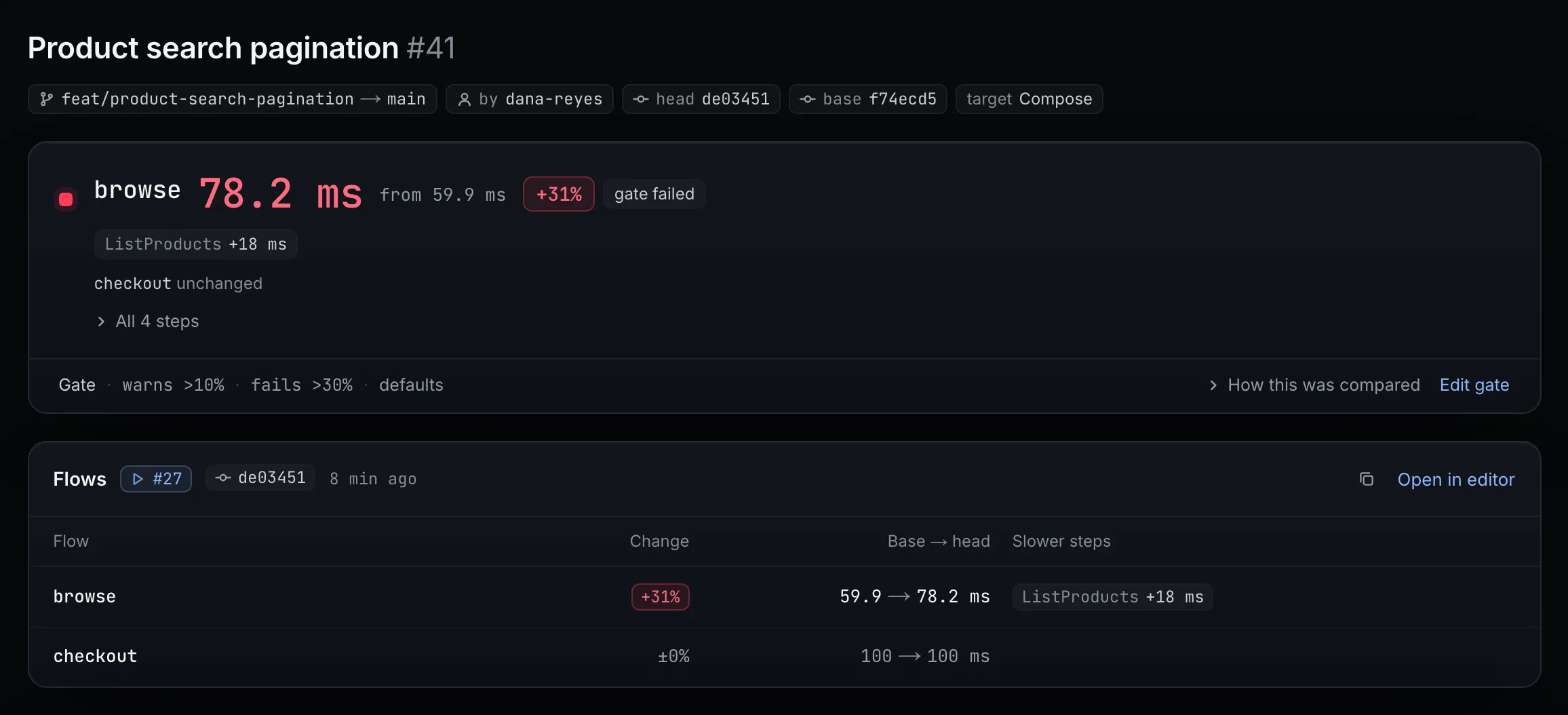
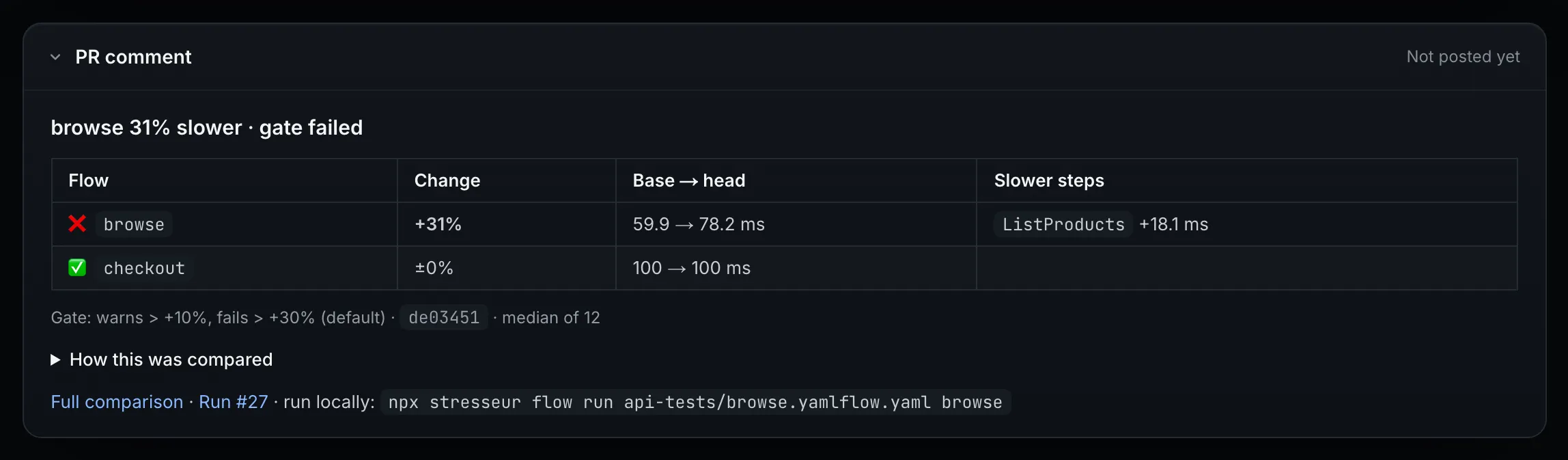
Your CI runs the flows and uploads per-step timings. Stresseur compares them with main and posts one check and one comment on the pull request.

Pull request #41 in Stresseur: browse takes 78.2 ms, up from 59.9 ms (+31%), and the gate failed. ListProducts is 18 ms slower; checkout is unchanged. The gate warns above 10% and fails above 30%.
The pull request page. The verdict says which flow got slower, by how much, and which step took the time.
The comment Stresseur posts on the pull request: browse 31% slower, gate failed. A table compares browse (+31%, 59.9 to 78.2 ms, ListProducts +18.1 ms) and checkout (±0%), and gives the command to run the flow locally.
The comment on GitHub. One comment per pull request, updated in place on each push.

Ask it on the pull request.

Tag @stresseur in a comment, or ask from the app. It answers with numbers from your runs and says when something is inferred from code rather than measured. It never merges and never pushes to main.

  • @stresseur why is this slower

    Traces a slowdown to a step and the code it hits. Every number links to the run it came from.

  • @stresseur test this

    Runs the flows this pull request touches against its preview environment.

  • @stresseur load test this

    Starts a load test on the preview and compares it with the last one on main.

Included on Team (50 tasks a month). Draft fix pull requests are not available yet.

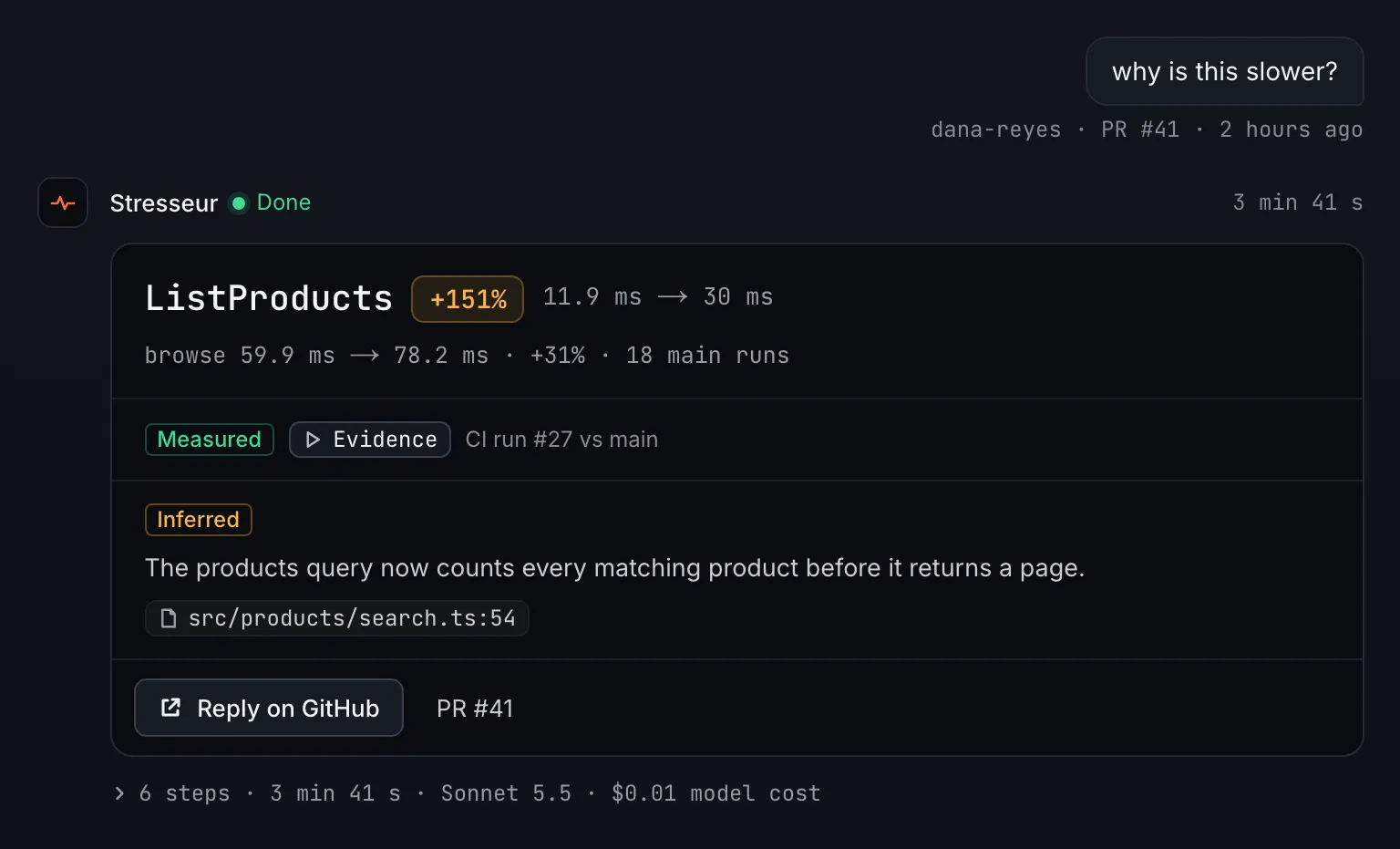
A test engineer answer in Stresseur. Asked “why is this slower?” on PR #41, it answers: ListProducts +151%, 11.9 ms to 30 ms, taking browse from 59.9 to 78.2 ms across 18 main runs. The numbers are marked measured, from CI run #27 against main. The cause, marked inferred: the products query now counts every matching product before it returns a page, src/products/search.ts:54.

Flows

Every flow, on every CI run.

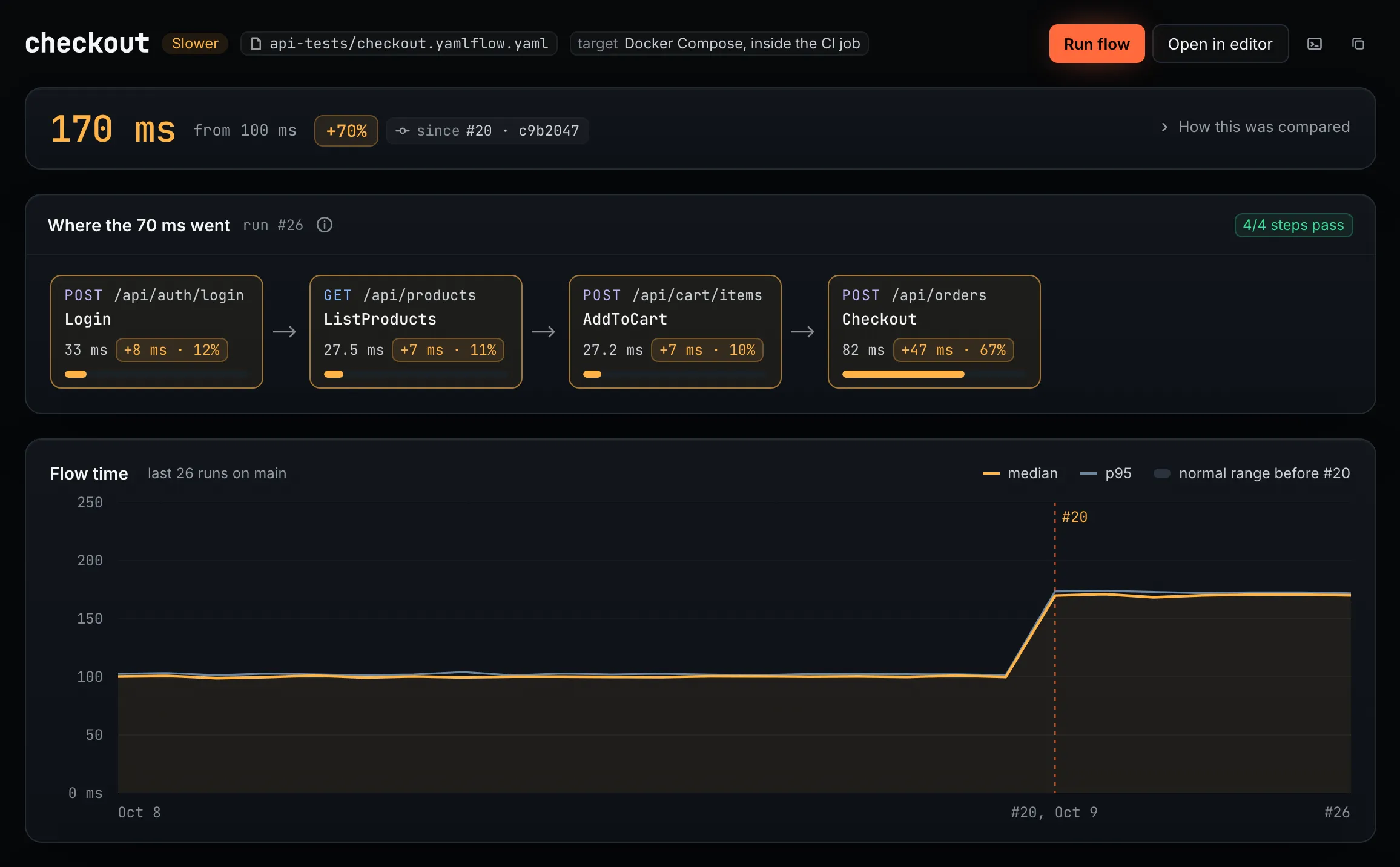
Each flow page gives a verdict, shows which steps took the time, and plots flow time across the last runs on main.

A flow is flagged only when it is at least 10% slower and outside its normal run-to-run variation, so a noisy runner does not page anyone.

The checkout flow page: 170 ms, up from 100 ms (+70%) since run #20, commit c9b2047. All 4 steps pass. Where the 70 ms went: Checkout +47 ms (67%), Login +8 ms, ListProducts +7 ms, AddToCart +7 ms. A chart of flow time across the last 26 runs on main steps up at run #20.
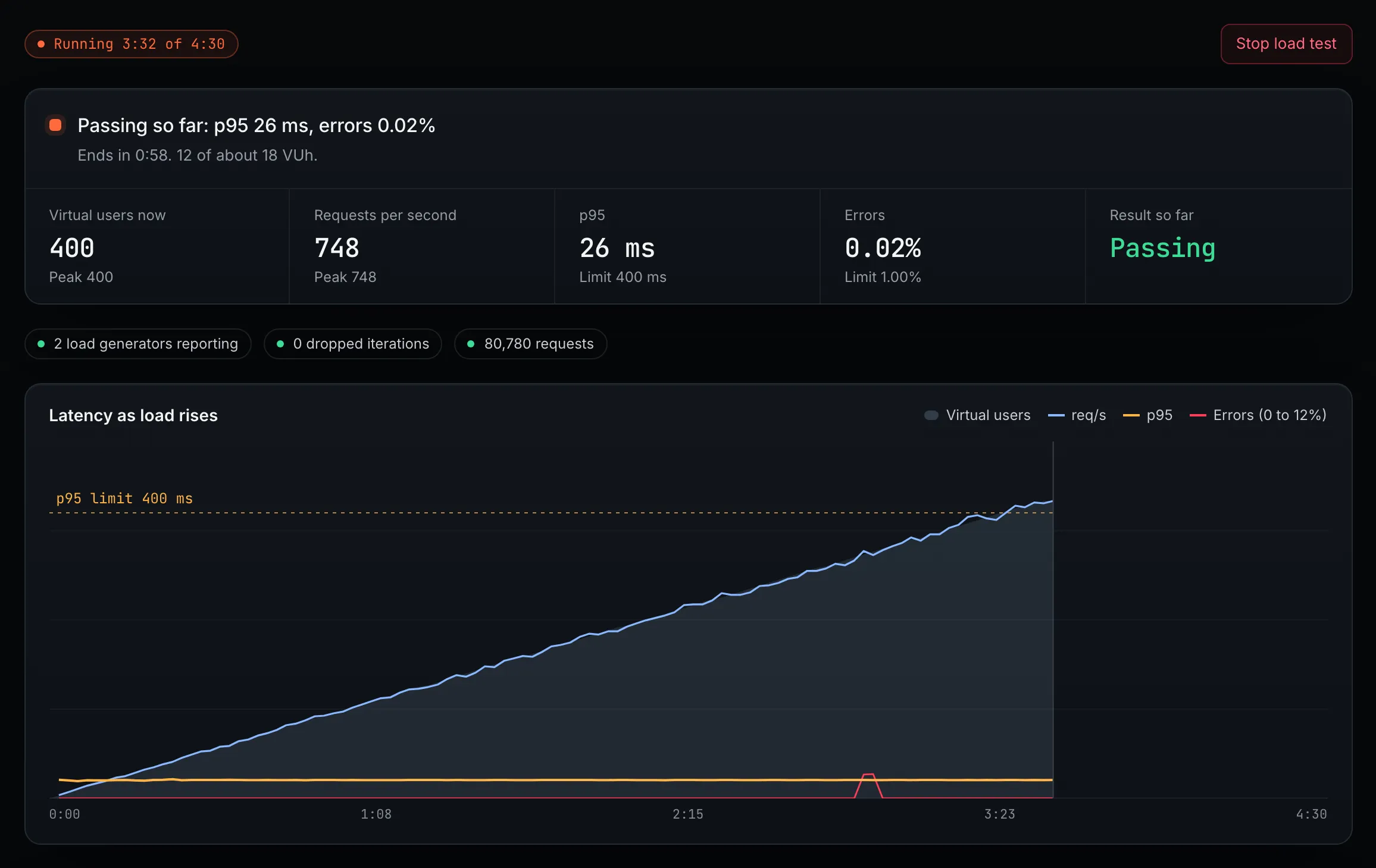
A load test running at 3:32 of 4:30: passing so far with p95 26 ms and 0.02% errors at 400 virtual users and 748 requests per second. Two load generators are reporting. A chart shows requests per second rising with virtual users while p95 stays flat, well under the 400 ms limit.

Load tests

Load test the same flows.

Pick a flow and a load profile from your repo. Stresseur starts load generators in the regions you choose and shows latency, req/s and errors live, against the thresholds in the profile.

Load goes only to domains you have verified, and a test stops on its own when its abort rule trips.

How load testing works

Three ways to run it

Same tests, wherever
you work.

AI API testing that fits the tools you already use. API test generation, end-to-end API tests, regression tests, and API load testing all come from the same recorded flows.

Studio

The local visual app

Open your recorded flows, edit them, and run end-to-end API tests on your own machine.

Download Studio →

CLI

For your coding agent

Your coding agent records flows, generates tests, and reruns the suite after every change. Fast enough to run on every edit.

Set it up →

GitHub bot

Runs on every PR

Your flows run in GitHub Actions on every pull request. Stresseur posts a check and a comment that say which flow got slower and which step took the time.

GitHub Action →

Shipping a chat, assistant or agent?Test its answers, speed and token use on every pull request →

Built on DevTools

Stresseur runs on the open-source DevTools engine.

From a YC alum, previously exited.

Open-source engine

Apache-2.0, runs locally

400+ GitHub stars

the-dev-tools/dev-tools

Local-first

Observed flows remain local.

Automatically redacted

Secrets and auth are removed before anything is stored.

Reviewable changes

Nothing changes without your approval.

Read about security →

Let Stresseur learn your API.

Connect a repo, add the workflow, and see each flow's timing on your next pull request.

Free for one repo. The CLI and flow runner stay open source.